IN THE SPOTLIGHT: MDE to MDB Conversion Service
(also supports: ACCDE to ACCDB, ADE to ADP, etc)

IN THE SPOTLIGHT: Access Database Repair Service
An in-depth repair service for corrupt Microsoft Access files

IN THE SPOTLIGHT: vbWatchdog
VBA error handling just got easier...

" vbWatchdog is off the chart. It solves a long standing problem of how to consolidate error handling into one global location and avoid repetitious code within applications. "
- Joe Anderson,
Microsoft Access MVP
Meet Shady, the vbWatchdog mascot watching over your VBA code →
(courtesy of Crystal Long, Microsoft Access MVP)
IN THE SPOTLIGHT: vbMAPI
An Outlook / MAPI code library for VBA, .NET and C# projects
Get emails out to your customers reliably, and without hassle, every single time.

Use vbMAPI alongside Microsoft Outlook to add professional emailing capabilities to your projects.
IN THE SPOTLIGHT: Code Protector
Standard compilation to MDE/ACCDE format is flawed and reversible.

The VariablesInspector object gives you the ability to programmatically inspect the values of all local variables in any or all of the procedures in the VB callstack.
When handling an exception in a global error handler, use the object returned by the ErrEx.Callstack.VariablesInspector property, and if you want to inspect the variables outside of a global error handler, then use the object returned by ErrEx.LiveCallstack.VariablesInspector instead.
Works with all editions of VBA6 and VBA7, even if running a compiled MDE/ACCDE or when using the Access runtime.
Also available in VB6 with the ULTIMATE EDITION, but only when debugging in the IDE. The VariablesInspector is unavailable from a fully compiled VB6 project.
The error dialogs provided by vbWatchdog have built in support for displaying the Variable contents:
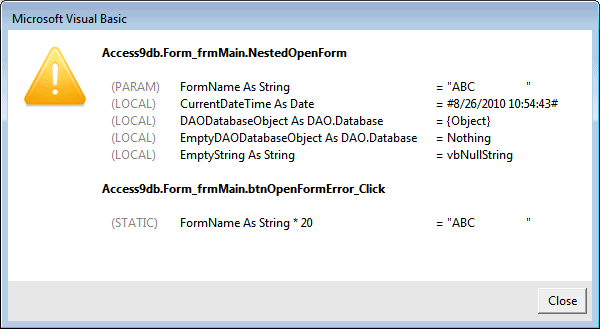
Please review the Customizing the Error Dialog document and also the Sample.MDB for further information. The remainder of this document focuses on programmatically accessing the variables.
In it's simplest form, you can call the VariablesInspector.DumpAll method which returns a String value containing a simple dump of all variable names, data types and current values:
Public Sub MyGlobalErrorHandler()

    MsgBox ErrEx.VariablesInspector.DumpAll

End Sub
This would produce something like this:
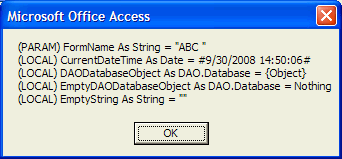
You can also traverse the call stack and for each procedure in the stack, dump all variables as a string:
Public Sub MyGlobalErrorHandler()

    Dim strDump As String

    Do

        ' Header text - module name + procedure name
        strDump = strDump & " >> " & ErrEx.CallStack.ModuleName & "." & ErrEx.CallStack.ProcedureName & vbCrLf & vbCrLf

        ' Dump the variable details from this procedure...
        strDump = strDump & ErrEx.CallStack.VariablesInspector.DumpAll & vbCrLf

    Loop While ErrEx.CallStack.NextLevel

    MsgBox strDump

End Sub
Which might produce:
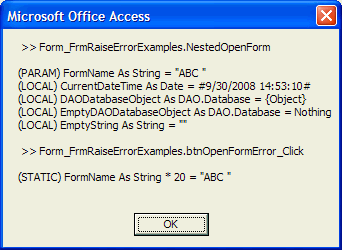
Taking this a step further - perhaps you want to customize the "dump" into your own format. This is how:
Start by calling the .FirstVar method which ensures we've got a reference to the first variable. Next, loop through the variables using the .NextVar mthod but checking first that we haven't reached the end of the variables list using the .IsEnd method.
Whilst iterating through the variables, use the following read-only properties to identify the variable:
| .Name | String expression of the variable name. |
| .TypeDesc | string expression of the variable data type (e.g. 'DAO.Database', 'Long', 'String' etc) |
| .Value | Read-only, variant copy of the variable value (no matter what data type, all values are coerced into this Variant property) |
| .ValueDesc | string expression of the value. String data types have the double-quotation marks added, 'Object' types are either 'Nothing' or '{Object}' etc. It is advised to use .ValueDesc rather than .Value under normal circumstances. |
| .Scope | enumeration to determine what type of variable this is - One of ParameterVariable, LocalVariable, StaticVariable or ModuleVariable. |
| .ScopeDesc | string expression of the .Scope property. One of "PARAM", "LOCAL", "STATIC" or "MODULE". |
An example:
With ErrEx.VariablesInspector

    .FirstVar

    While .IsEnd = False

        strDump = strDump & "(" & .ScopeDesc & ") " & .Name & " As " & .TypeDesc & " = " & .ValueDesc & vbCrLf

        .NextVar

    Wend

    MsgBox strDump

End With
Similarly, this technique can be used on the ErrEx.CallStack.VariablesInspector instead whilst traversing through the call stack.
Check out the Sample.mdb for an example of using the DumpAll method to conveniently dump all variables values as text.
TWINBASIC LTD (Company No. 16590181, VAT No. GB497509439)
Terms | Privacy | Sitemap | X (Twitter)

