IN THE SPOTLIGHT: MDE to MDB Conversion Service
(also supports: ACCDE to ACCDB, ADE to ADP, etc)

IN THE SPOTLIGHT: Access Database Repair Service
An in-depth repair service for corrupt Microsoft Access files

IN THE SPOTLIGHT: vbWatchdog
VBA error handling just got easier...

" vbWatchdog is off the chart. It solves a long standing problem of how to consolidate error handling into one global location and avoid repetitious code within applications. "
- Joe Anderson,
Microsoft Access MVP
Meet Shady, the vbWatchdog mascot watching over your VBA code →
(courtesy of Crystal Long, Microsoft Access MVP)
IN THE SPOTLIGHT: vbMAPI
An Outlook / MAPI code library for VBA, .NET and C# projects
Get emails out to your customers reliably, and without hassle, every single time.

Use vbMAPI alongside Microsoft Outlook to add professional emailing capabilities to your projects.
IN THE SPOTLIGHT: Code Protector
Standard compilation to MDE/ACCDE format is flawed and reversible.


vbWatchdog Version 5 is here! Check out What's new in v5
Frustrated with the old-school VBA debugger? Elevate your applications' professionalism with vbWatchdog. It's engineered to streamline your code, enhancing its durability and maintainability. With vbWatchdog, gain comprehensive oversight of error handling in your VBA and VB6 projects, streamlining your development process.
| Typical vbWatchdog developer error dialog | ➜ | 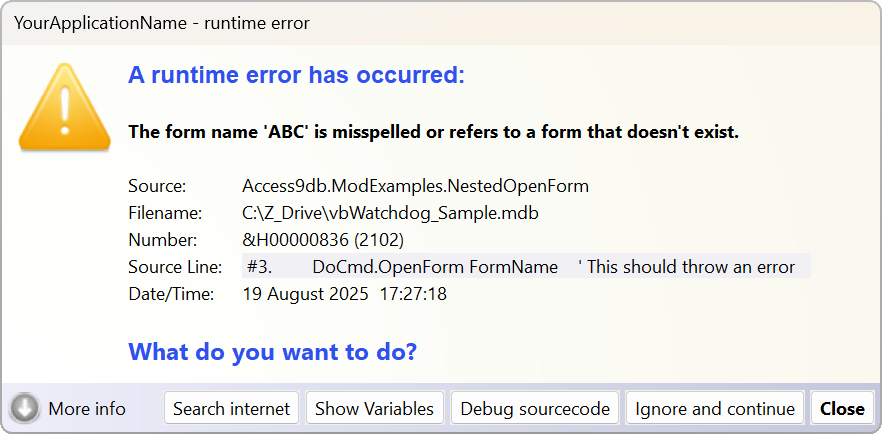 |
Even robust software can have errors... it's how you deal with them that matters.
With vbWatchdog, you can programmatically:
 |
Track errors globally by defining a custom procedure that is invoked when an error occurs |
|
Determine the context of each error (for example, whether or not it is an unhandled error) |
|
Query the VB callstack to identify the exact source procedure of error |
|
Read and log the live values of all local variables in the callstack |
|
Pinpoint the line of code that caused the failure (with automatic source code line numbering) |
|
Display a professional and fully customizable error dialog |
|
... plus much more! |
There are no extra files to distribute to your end-users as vbWatchdog installs itself directly into your project files (within class modules inside your projects).
The product is licenced on a per-developer or per-site basis. Licence cost is USD $260 for a single developer. Price includes royalty free end-user rights.
vbWatchdog supports VBA6 / VBA7 projects (that means Office versions from v2000 onwards), and VB6 projects.
Installation + Getting Started Guide
What's new in v5
Getting Started Videos BUY NOW
|
Allows you to identify the source procedure and module name where the error occurred |
|
List the exact line number to identify the line of code that failed |
|
Report the full callstack that led up to the exception |
|
Allows local error handling to co-exist with your global error handler |
|
Choose to either handle the error globally, or just use it as an error-tracing tool |
|
You have a customizable error dialog at your fingertips (inc. debug options) |
|
No third-party DLLs required - vbWatchdog is coded neatly inside your VB environment |
|
Royalty free licensing |
|
14 day money back guarantee |
|
Detailed online manual Getting Started Sample.MDB |
Wait... there's even more...
|
List values of variables within each procedure on the callstack [VBA only] |
|
A Try-Catch paradigm for simplifying local error handling |
|
LiveCallstack object that can be used outside of your global handler |
|
Prevents the Access Runtime from closing on unhandled VBA errors |
Price
This product is available in two distinct versions. The Enterprise Edition is designed for use in Microsoft Office VBA documents and applications. The Ultimate Edition can be used in any VBA enabled application (not just Office applications), and can additionally be used in any classic VB6 application.
Enterprise
Edition
USD $260
for a single developer licence.
Ultimate Edition USD $330 for a single developer licence.
Purchase a licence
Requirements
Supports VBA6 and VBA7 (that's Office v2000 onwards). Supports both 32 bit and 64 bit editions of Office. Also supports all special editions such as the Access Runtime environment.
Supports all versions of Windows. Office for MAC not yet supported.
New to version 3: supports classic VB6 projects too (Ultimate Edition licence).
TWINBASIC LTD (Company No. 16590181, VAT No. GB497509439)
Terms | Privacy | Sitemap | X (Twitter)
I would never want to return to the dark days before vbWatchdog when I was adding more than half a dozen lines of error-handling boilerplate to almost every procedure I wrote.
- Mike Wolfe (Access MVP)
vbWatchdog is off the chart. It solves a long standing problem of how to consolidate error handling into one global location and avoid repetitious code within applications.
I had the privilege of Beta testing vbWatchdog and consequently I'm quite familiar with its outstanding capabilities and multitude of extremely cool features. In fact, Wayne added some features I suggested, which have seriously amped up my ‘end user experience’.
Among other things, I develop/manage over 25 Microsoft Access databases (mdb/accdb) on my current job. I have integrated vbWatchdog into a single library mdb. Each application mdb is referenced to the library mdb, which connects to a single error log mdb on a server. Virtually any error occurring in any of my apps is automatically written to the error log, all of which is handled by vbWatchdog. This is HUGE!
- Joe Anderson (Access MVP)
First of all, I have to say that this is an awesome piece of software. I had developed my own Global Error Handler, but this is in a totally different universe.
I have implemented it in an Access XP project that will send an error report over an XML Web Service back to our support team, which includes a complete call stack and variable dump.
Keep up the good work.
- Steve Falla @ JCS
And for some comments from the official Access Team Blog...
This is an excellent product. I've been using it for 2 or 3 months now and am truly impressed. Once you have got it up and running, it makes coding considerable neater and simpler.
Most of my procedures now have no specific error-handling code in them because vbWatchdog picks up any errors directly...
- Alan Cossey @ PDTL
vbWatchdog Global Error Handler is the best Tool for Microsoft Access Developers. It helps to build better and secure Microsoft Access Applications.
This tool also helps you to get valuable informations from your Clients when errors occur...
- Andreas Vogt @ AccessBlog
I´d like to recommend the product to all serious Access developers - it helps during development with enhanced information about runtime errors, status of variables etc., but the best thing to me is the ability to catch EVERY error even in your runtime version, but you do not need special error handling in every sub or function - so you´re always on the secure side.
And last but not least - the support is very fast and Wayne is really a nice guy!
- Joachim Bartels @ AGAMedia

