IN THE SPOTLIGHT: MDE to MDB Conversion Service
(also supports: ACCDE to ACCDB, ADE to ADP, etc)

IN THE SPOTLIGHT: Access Database Repair Service
An in-depth repair service for corrupt Microsoft Access files

IN THE SPOTLIGHT: vbWatchdog
VBA error handling just got easier...

" vbWatchdog is off the chart. It solves a long standing problem of how to consolidate error handling into one global location and avoid repetitious code within applications. "
- Joe Anderson,
Microsoft Access MVP
Meet Shady, the vbWatchdog mascot watching over your VBA code →
(courtesy of Crystal Long, Microsoft Access MVP)
IN THE SPOTLIGHT: vbMAPI
An Outlook / MAPI code library for VBA, .NET and C# projects
Get emails out to your customers reliably, and without hassle, every single time.

Use vbMAPI alongside Microsoft Outlook to add professional emailing capabilities to your projects.
IN THE SPOTLIGHT: Code Protector
Standard compilation to MDE/ACCDE format is flawed and reversible.

Provided by Allen Browne. Created: March 2007. Last Updated: November 2008.
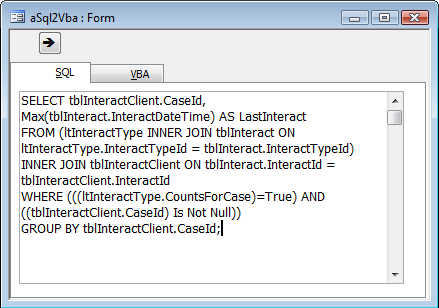
Rather than typing complex query statements into VBA code, developers often mock up a query graphically, switch it to SQL View, copy, and paste into VBA.
If you've done it, you know how messy it is sorting out the quotes, and the line endings.
Solution: create a form where you paste the SQL statement, and get Access to create the SQL string for you.
The form just needs two text boxes, and a command button. SQL statements can be quite long, so you put the text boxes on different pages of a tab control.
Private Sub cmdSql2Vba_Click()
    Dim strSql As String
    'Purpose:   Convert a SQL statement into a string to paste into VBA code.
    Const strcLineEnd = " "" & vbCrLf & _" & vbCrLf & """"

    If IsNull(Me.txtSQL) Then
        Beep
    Else
        strSql = Me.txtSQL
        strSql = Replace(strSql, """", """""")  'Double up any quotes.
        strSql = Replace(strSql, vbCrLf, strcLineEnd)
        strSql = "strSql = """ & strSql & """"
        Me.txtVBA = strSql
        Me.txtVBA.SetFocus
        RunCommand acCmdCopy
    End If
End Sub
To use the form:
Hint: If you want extra line breaks in your VBA code, press Enter to create those line breaks in the SQL View of the query or in your form.
These versions lacked the Replace() function. To use the code with those versions, copy the custom Replace() function from this utility.
| Home | Index of tips | Top |
Rate this article: 
This is a cached tutorial, reproduced with permission.
TWINBASIC LTD (Company No. 16590181, VAT No. GB497509439)
Terms | Privacy | Sitemap | X (Twitter)


