IN THE SPOTLIGHT: MDE to MDB Conversion Service
(also supports: ACCDE to ACCDB, ADE to ADP, etc)

IN THE SPOTLIGHT: Access Database Repair Service
An in-depth repair service for corrupt Microsoft Access files

IN THE SPOTLIGHT: vbWatchdog
VBA error handling just got easier...

" vbWatchdog is off the chart. It solves a long standing problem of how to consolidate error handling into one global location and avoid repetitious code within applications. "
- Joe Anderson,
Microsoft Access MVP
Meet Shady, the vbWatchdog mascot watching over your VBA code →
(courtesy of Crystal Long, Microsoft Access MVP)
IN THE SPOTLIGHT: vbMAPI
An Outlook / MAPI code library for VBA, .NET and C# projects
Get emails out to your customers reliably, and without hassle, every single time.

Use vbMAPI alongside Microsoft Outlook to add professional emailing capabilities to your projects.
IN THE SPOTLIGHT: Code Protector
Standard compilation to MDE/ACCDE format is flawed and reversible.

Let's take a look at the VB call stack window:
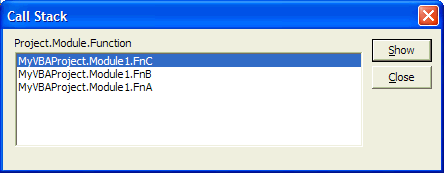
This window shows you the procedure that we’re in (the top item), and the previous function calls that occurred to get there.
In other words, a call stack provides you with the path that was taken to get to where you are now.
Sadly, it is not normally possible to access the call stack in VBA (nor VB6). However, with vbWathdog, this is now a possibility...
The error dialogs provided by vbWatchdog have built in support for displaying the call stack:
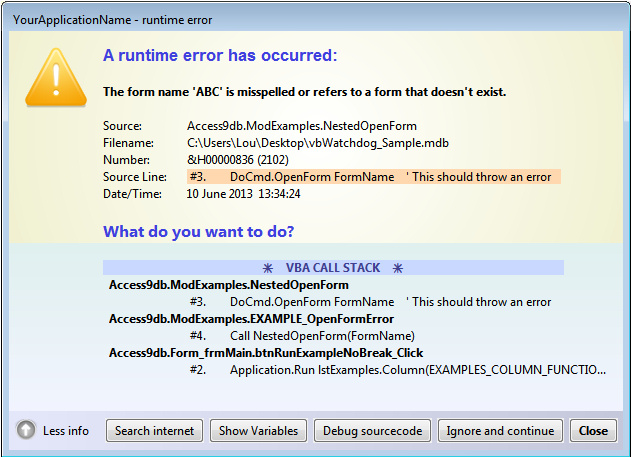
Please review the Customizing the Error Dialog document and also the Sample.MDB for further information. The remainder of this document focuses on programmatically accessing the callstack.
The ErrEx.CallStack property returns an object that gives you programmatic access to the VB call stack details at runtime from within your global error handler. The object returned relates only the error being handled.
Similarly, the ErrEx.LiveCallStack property returns an object that gives you access to the live VB call stack details at runtime. This object can be used outside of your global error handler.
The objects returned from these properties expose two methods and six properties that relate directly to the call stack:
| .FirstLevel | (method): puts you at the top of the stack i.e. the procedure that caused the error. |
| .NextLevel | (method): moves you to the next stack level, returns False if at the end of stack. |
| .ProcedureName | (read-only property): returns the current stack item procedure name, as a string. |
| .ModuleName | (read-only property): returns the current stack item module name, as a string. |
| .ProjectName | (read-only property): returns the current stack item project name, as a string. |
| .LineNumber | (read-only property): returns the current stack item source code line number see QuickStart: Automatic line numbering |
| .LineCode | (read-only property): returns the current stack item line of source code as a string see QuickStart: Automatic line numbering |
| .HasActiveErrorHandler | (read-only property): indicates whether the procedure has an active error handler (On Error Goto X, or On Error Resume Next) or not. This is useful for logging propagating errors - see QuickStart: Error Propagation |
| .ProjectFilename | (read-only property): returns the VB project filename associated with the callframe. |
| .ProjectConditionalCompilationArgs | (read-only property): returns the compiler conditional arguments associated with the callframe. |
| .ProjectIsCompiled [VBA only] | (read-only property): returns a boolean value indicating the compilation state of the project associated with the callframe. |
| .ProjectIsSaved [VBA only] | (read-only property): returns a boolean value indicating the save state of the project associated with the callframe. |
| .VBEProject [VBA only] | (read-only property): returns the VBE object (from the Extensibility Library) associated with the callframe. |
Furthermore, the object also exposes the VariablesInspector method which returns a class object for enumerating through the local variables that have been declared in the procedure at the current stack level.
Let's look at a way of logging the call stack to a log file:
Public Sub LogErrorToFile()

    Dim FileNum As Long
    Dim LogLine As String
    Dim FilePath As String

    On Error Resume Next ' If this procedure fails, something fairly major has gone wrong.

    ' We will write to a simple text file called SampleErrorLog in our MyDocuments folder
    FilePath = CreateObject("WScript.Shell").SpecialFolders("MYDOCUMENTS") & "\SampleErrorLog.txt"

    FileNum = FreeFile
    Open FilePath For Append Access Write Lock Write As FileNum

        Print #FileNum, Now() & " - " & CStr(ErrEx.Number) & " - " & CStr(ErrEx.Description)

        'We will separate the call stack onto separate lines in the log
	With ErrEx.CallStack
            Do
                Print #FileNum, "       --> " & .ProjectName & "." & _
                                .ModuleName & "." & _
                                .ProcedureName & ", " & _
                                "#" & .LineNumber & ", " & _
                                .LineCode & vbCrLf
            Loop While .NextLevel
	End With

    Close FileNum

End Sub
The above Do-loop is iterating through the call stack, logging to a file - outputting like this:
27/08/2008 12:30:00 - 11 - Division by zero
       --> MyVBAProject.Module1.FnC, #1, Debug.Print 1 / 0
       --> MyVBAProject.Module1.FnB, #2, Call FnC
       --> MyVBAProject.Module1.FnA, #2, Call FnB
Take a look at the
VariablesInspector guide where we enhance this logging further to include a dump of all the variables at each procedure stack level.If you don't wish to have a global error handler routine, and instead just want to read the LiveCallstack details to enhance your existing code with minimal changes, you can enable vbWatchdog without specifying an "OnError" handler. You do this by calling ErrEx.Enable with a blank parameter:
ErrEx.Enable ""
Then, for example, you could use normal local error handling like so:
Public Sub Test()

    On Error Goto ErrorHandler

    Debug.Print 1/0

    Exit Sub

ErrorHandler:
    MsgBox "Error occurred in: " & _
            ErrEx.LiveCallStack.ModuleName & "." & ErrEx.LiveCallStack.ProcedureName

End Sub
As you can see, this gives you the opportunity to stop hard-coding the values and thus makes maintenance easier without having to implement any major changes to your code.
iTech Masters | VAT: GB202994606 | Terms | Sitemap | Newsletter
 Twitter
