IN THE SPOTLIGHT: MDE to MDB Conversion Service
(also supports: ACCDE to ACCDB, ADE to ADP, etc)

IN THE SPOTLIGHT: Access Database Repair Service
An in-depth repair service for corrupt Microsoft Access files

IN THE SPOTLIGHT: vbWatchdog
VBA error handling just got easier...

" vbWatchdog is off the chart. It solves a long standing problem of how to consolidate error handling into one global location and avoid repetitious code within applications. "
- Joe Anderson,
Microsoft Access MVP
Meet Shady, the vbWatchdog mascot watching over your VBA code →
(courtesy of Crystal Long, Microsoft Access MVP)
IN THE SPOTLIGHT: vbMAPI
An Outlook / MAPI code library for VBA, .NET and C# projects
Get emails out to your customers reliably, and without hassle, every single time.

Use vbMAPI alongside Microsoft Outlook to add professional emailing capabilities to your projects.
IN THE SPOTLIGHT: Code Protector
Standard compilation to MDE/ACCDE format is flawed and reversible.

Provided by allenbrowne.com, June 2006.
In Access, you use the double-quote character around literal text, such as the Control Source of a text box:
="This text is in quotes."
Often, you need quote marks inside quotes, e.g. when working with DLookup(). This article explains how.
You cannot just put quotes inside quotes like this:
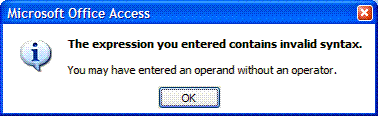
="Here is a "word" in quotes" ï Error!
Access reads as far as the quote before word, thinks that ends the string, and has no idea what to do with the remaining characters.
The convention is to double-up the quote character if it is embedded in a string:
="Here is a ""word"" in quotes"
It looks a bit odd at the end of a string, as the doubled-up quote character and the closing quote appear as 3 in a row:
="Here is a ""word"""
Summary:
| Control Source property | Result | Explanation |
| ="This is literal text." | This is literal text. |
Literal text goes in quotes. |
| ="Here is a "word" in quotes" |
|
Access thinks the quote finishes before word, and does not know what to do with the remaining characters. |
| ="Here is a ""word"" in quotes" | Here is a "word" in quotes |
You must double-up the quote character inside quotes. |
| ="Here is a ""word""" | Here is a "word" |
The doubled-up quotes after word plus the closing quote gives you 3 in a row. |
Where this really matters is for expressions that involve quotes.
For example, in the Northwind database, you would look up the City in the Customers table where the CompanyName is "La maison d'Asie":
=DLookup("City", "Customers", "CompanyName = ""La maison d'Asie""")
If you wanted to look up the city for the CompanyName in your form, you need to close the quote and concatenate that name into the string:
=DLookup("City", "Customers", "CompanyName = """ & [CompanyName] & """")
The 3-in-a-row you already recognise. The 4-in-a-row gives you just a closing quote after the company name. As literal text, it goes in quotes, which accounts for the opening and closing text. And what is in quotes is just the quote character - which must be doubled up since it is in quotes.
As explained in the article on DLookup(), the quote delimiters apply only to Text type fields.
The single-quote character can be used in some contexts for quotes within quotes. However, we do not recommend that approach: it fails as soon as a name contains an apostrophe (like the CompanyName example above.)
| Home | Index of tips | Top |
Rate this article: 
This is a cached tutorial, reproduced with permission.
iTech Masters | VAT: GB202994606 | Terms | Sitemap | Newsletter
 Twitter